
Installation
1. Requirements
Before you begin using PricePalettes, make sure you have:
Divi Theme or Divi Builder plugin installed and active with the latest version.
2. File Structure
When you purchase PricePalettes, you’ll get a single .zip package that contains all the pricing layouts in .json format.
To access the layouts, simply unzip the file on your computer.
Inside the extracted folder, you’ll see two main folders:
Combined Layouts – Includes
.jsonfiles where 10 pricing sections are grouped together in one file.Individual Sections – Includes separate
.jsonfiles for each pricing section, allowing you to import them one by one.

3. Importing Layouts
Navigate to Divi > Divi Library in your WordPress Dashboard.

At the top of the page, click on Import & Export.
Switch to the Import tab.
Upload the desired
.jsonfile from the extracted PricePalettes folder.Click Import Divi Builder Layouts.
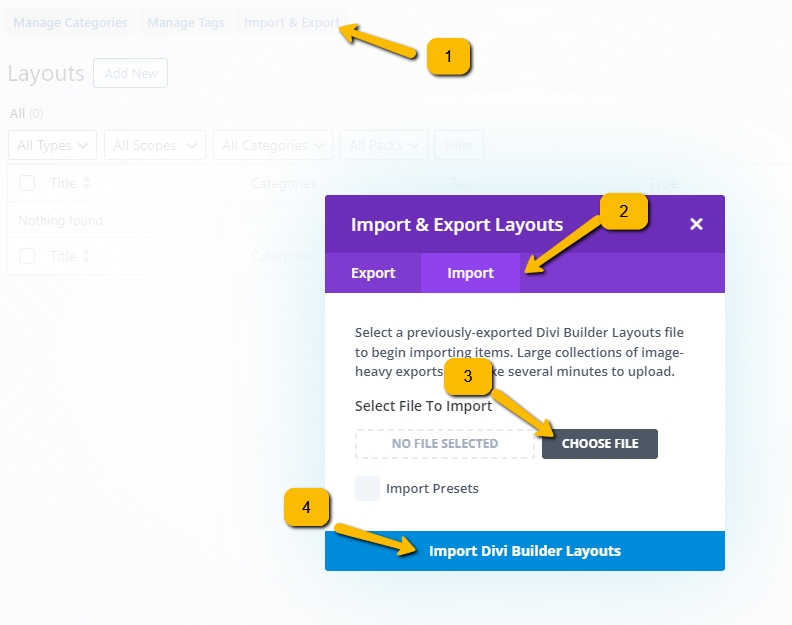
Once the import is finished, the layouts will appear in your Divi Library and will be ready to insert into any page.
Last updated